
MERGING GAMES
WITH AI
Start with one mechanic in one test level. Choose a supported project, give your coding agent a clear brief, and check the result in the game.
Want to play an existing project instead? Explore author downloads. The worked example below uses original shapes. The catalog’s game builds remain untested here.
What does “merging games” mean?
A game mashup can combine mechanics, put one game inside another, or rebuild a world in a different engine. It does not have to combine two complete games or use AI.
- A mechanic crossover: Mari0 combines Mario-style platforming with Portal-style puzzles in a standalone fan game.
- A game inside a game: NucleDoom runs classic DOOM in Minecraft.
- A remake: Skywind rebuilds Morrowind in Skyrim: Special Edition and is still in development.
AI can help write and debug code. It still needs a project, usable tools and a way to test changes. A generated clip or a successful code build does not prove that a mashup is playable.
What you need before you start
Choose the route that matches the files and tools you have. Check the exact game, engine and mod-loader versions before you edit anything.
- Your own game project
- A project you can edit, its working editor or engine, and assets you can use. Start here if you want to combine mechanics without changing commercial game files.
- A mod for an existing game
- The required game, its documented modding tools, and matching dependencies. If the documentation does not expose the feature you need, choose a smaller mechanic or another target.
- A Melty mashup
- Melty’s site advertises Windows and requires the games used by the mashup. Its creation route uses publisher instructions with Claude Code or Codex. Check those instructions for your intended games; we have not verified arbitrary-pair compatibility.
For the Claude Code route below, install the coding tool and confirm your account access. Anthropic lists supported Claude subscriptions, Claude Console accounts and cloud-provider access. Follow the official Claude Code quickstart for current setup and account requirements. Check your account’s usage limits and charges before starting a long task.
Keep a copy of the project and any affected saves. Use a separate test folder or the game’s documented test profile. Read the relevant project and asset licenses before sharing files.
Merging games with AI: a six-step workflow
The example below uses an original test level. For a commercial-game mod, replace the example with a feature supported by that game’s documentation.
- Define one playable result. Choose one mechanic, one level and one pass condition. For example: a player can place a block to reach a raised platform. Leave multiplayer and a second mechanic for later.
- Run the unchanged project. Open it in the supported editor or launch the unmodified game. Confirm that movement, restart and quit work. Record the versions and create a backup before proceeding. If this baseline fails, fix it before adding AI changes.
- Ask the agent to inspect first. Open the coding tool in the test project’s folder. Give it the official API or modding documentation, exact versions and intended mechanic. Ask for a plan and the files it would change before approving edits.
- Build one small change. Adapt the brief below. Review the proposed files and dependencies. Implement only the first mechanic, then use the project’s documented build or run command.
- Test in the actual game. Check movement, the new mechanic, restart and quit. Reopen the project and repeat the task. For a mod, test with the specified game and loader versions. Compare the result with your pass condition; a screenshot is not enough.
- Save a working version. Keep the successful change in a separate version or Git commit. If it fails, restore the backup and confirm the baseline still works. Before sharing, document dependencies, controls, installation, removal and known failures.
Choose a first mechanic for merging games with AI
Describe the behavior you want before naming the games that inspired it. “Combine two open worlds” leaves the engine, controls and pass condition unclear. A smaller request is easier to inspect and test.
- Instead of “merge Minecraft and a platformer”
- Ask for one block the player can place to reach a ledge. Test placement, collision and restart before adding crafting or a larger world.
- Instead of “add Portal to my game”
- Ask for two linked trigger areas in one test room. Specify where the player appears and how you prevent immediate repeated teleporting. Leave momentum and moving objects for a later change.
The Block Step example below implements the block-placement brief. The linked-trigger idea is a planning example and has not been implemented or tested here. For an existing-game mod, first confirm that its documented tools expose the required behavior.
Keep a short test record
For each attempt at merging games with AI, record the versions, changed files, run command and expected result. Add the actual result after playing the test level. Include a reproduction path for failures, such as “place a block, restart, then try placing another.”
If the first run works, close and reopen the project. Repeat the same task and check the original controls. Record what remains untested, including other computers or multiplayer. This separates a reproducible result from a change that only worked once.
How do I merge games with Claude?
The terminal route starts Claude Code inside your project folder. Replace the example path with your test folder. These commands open the assistant; they do not create a game by themselves.
cd "path/to/your/test-project"
claude
First ask it to explain the project, find the documented build command and identify the supported extension points. Then give it your brief. Anthropic’s workflow documentation covers project exploration, small changes and testing.
If you choose Melty, follow its current instructions instead of assuming the generic project steps configure its launcher. Its publisher describes passing those instructions to Claude Code or Codex. Our Melty guide separates its advertised features from what this directory has checked.
An example brief for a small prototype
This is an editorial template, not a tested recipe. Fill in the project-specific fields before giving it to your coding agent.
Project: [test folder and engine or game]
Versions: [engine, game and mod loader, if used]
Documentation: [official API or modding guide]
Baseline: [how I run the unchanged project]

Goal: add one block-placement mechanic to my test level.
Use placeholder shapes. Do not import commercial game assets.
Keep existing movement, restart and quit controls.

Inspect the project first. Propose a plan and list changed files.
If an API or dependency is missing, explain the gap before editing.
Do not install new tools or publish a build without my approval.

Pass condition: I can place a block, stand on it, and reach a
raised platform. Restart removes the block. The same task works
after I close and reopen the project.

Implement one change, state the run command, and list manual
checks and known limitations. Explain how to restore the baseline.
If the prototype does not work
- The unchanged game will not start: restore the baseline and use the game or tool’s own troubleshooting guide. Keep AI changes out until the baseline runs.
- A dependency or API is missing: compare the error with the official setup documentation and your installed versions. Do not let the agent invent an API or replace tools without review.
- It builds, but nothing changes in the game: check the documented loading path and startup log. Confirm that the correct mod or test project is active before changing more code.
- Controls, saves or restart break: restore the working version. Give the agent the exact error and a short reproduction path, then test a smaller change.
- An update breaks the mod: compare game and dependency versions with the creator’s compatibility notes. If a matching setup is unavailable, record the incompatibility and stop that test.
A worked example: platforming plus block placement
Block Step is a small, original browser prototype. Move and jump in a test level, then place one block to reach the raised goal. It demonstrates combining two mechanics; it does not modify or combine commercial game files.
- Check the baseline. Move and jump in version 0.1. There is no block-placement mechanic, so its raised goal is out of reach.
- Try the added mechanic. Version 0.2 adds one block at the marked slot. Jump onto it, then jump onto the raised platform.
- Test recovery. Restart to clear the block. Pause and resume, then exit and reopen the example to check its initial state.
- Edit your own copy. Extract the ZIP and open
index.htmlfor version 0.2 orbaseline.htmlfor version 0.1. The included README names the controls, source files and the restore path.
The source uses plain JavaScript and the browser’s Canvas API, with no external assets or libraries. The code is AI-authored and supplied under the included MIT license. There is no save system, multiplayer or connection to Melty.
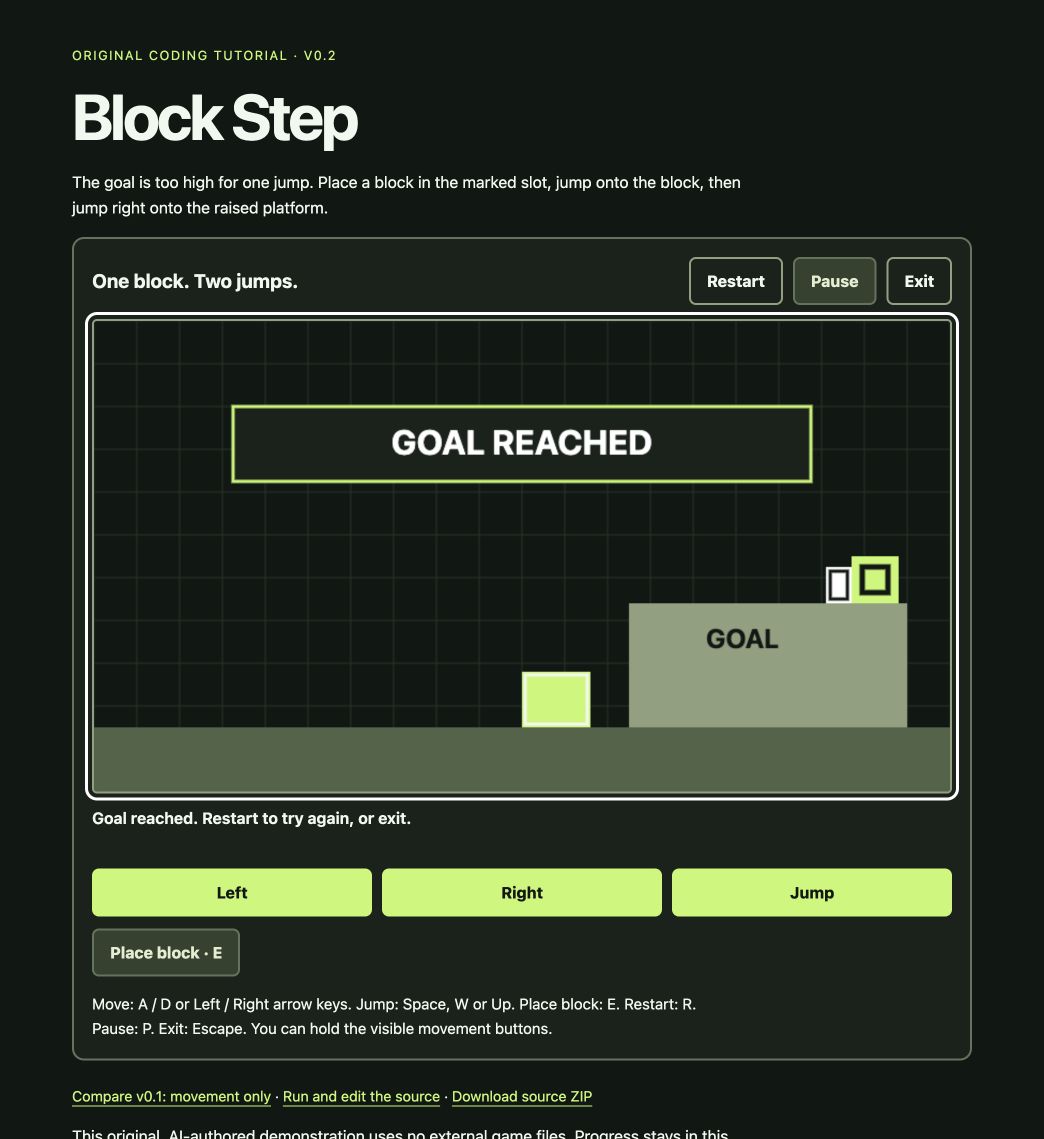
Checked in the Codex in-app browser on October 9, 2026: baseline movement, the two-jump route with a block, restart, pause/resume and exit/reopen. Restart and reopening clear the block. This check covers this original prototype; it does not establish compatibility for the catalog’s game builds.
Can I merge any two games?
There is no universal merger demonstrated by this directory. Different engines, inaccessible APIs and version mismatches can prevent a particular combination. A local prototype does not establish multiplayer support, performance on another PC or compatibility after an update.
AI-generated code still needs review and testing. We have not installed Melty, used its publishing workflow, or play-tested the catalog. None of the current entries has a browser-play path confirmed by us.
Before downloading a viral mashup
- Use the original creator’s release page, not an unrelated download mirror.
- Check required games, supported versions, operating system and dependencies.
- Read installation and removal instructions, then back up affected saves.
- Look for gameplay and a specific release. A video alone does not establish a usable download.
Bannerlord × Minecraft Passthrough, BaldCraft: C# Edition, Five Nights at Freddy’s: Management Wanted, MH4U Port, PerkeleRim, FortCraft, DOOMSona, GrandTheftMinecraft, SMC64, Sora in Borderlands, Hollow Sols, Wither Storm × GTA V Passthrough, L4D2 × Minecraft, GTA San AnSkateas, Halfcraft for Half Sword, Super Sekiro 64, WitcherCraft, MinePeak, TamrielMerge, Mario Mode for Spider-Man 2, ValCraft, SilentDOOM, FalloutCraft, SkateGM, Ultracraft, Killcraft, SkyCraft, SkyDoom, SekiroCraft, OWCraft, SUPER IS HOT, Mari0, NucleDoom, Balatro in Minecraft, 2010 Rust Rewrite Mashup, Minecraft Zombies have creator release listings. They are author downloads, not builds play-tested by this directory. Each project page gives its original source, requirements and recorded limitations.
Sources and review date
Workflow sources checked : Melty’s publisher site, Claude Code quickstart and Claude Code workflows. Project examples link to their separate source records. This date records a source review, not a gameplay test.